
This is an old revision of the document!
Table of Contents
Post Versions
To find what version a post is, first step is to check it's matching .mmd, which you can do with windows explorer preview or by right clicking and checking properties.
If you don't have the mmd to look at, or you can't verify the version of the mmd is the same as the pst, you need to look to the first line of the post.

Here is a list of the versions:
2021 = 23
2020 = 22
2019 = 21
2018 = 20
2017 = 19
X9 = 18
X8 = 17
X7 = 16
X6 = 15
X5 = 14
X4 = 13
X3 = 12
X2 = 11
X = 10
V9 = 9
V8 = 8
V7 = 7
V6 = 6
Which Version For Updating
When updating the posts, note that Version X8 was the last version that could update any prior version. Starting in X9, Mastercam only allows updating up to 3 versions back. That means, if you its Version X9 or above, you need to run multiple updates to get to the latest version. Here is what it looks like:
X8 updates X7 and all versions before
X9 updates X6 thru X8
2017 updates X7 thru X9
2018 updates X8 thru 2017
2019 updates X9 thru 2018
2020 updates 2017 thru 2019
2021 updates 2018 thru 2020
Here is an example:
Say you want to update an X7 post up to 2021. First, you can open 2017 and run your update. Then you can update your 2017 post to 2020. Then you can get it to 2021.
Troubleshooting Updates
Most of the time, just like any other type of error, look to the log to see what went wrong. There should be an explanation.
The post team doesn't often run into errors updating, because in general we watch the error log and fix it as we go. But users, and sometimes the tech team, might miss an error now that the log isn't opening as a separate text file, like it used to, when things go wrong. So users can easily miss important update problems and what you commonly will get is a tech guy asking why a post won't update without any warning messages indicating what went wrong.
What's happening in this case, 99% of the time, is the text section did not covert properly when moving from 2017 up. In 2018, the text section was converted to xml. If the 2017 file had a problem converting to xml, the entire post update just fails, with no warning. Most other failures have a warning so this one is most assuredly from the text section conversion.
Finding what went wrong is the next question. Often, its a tag that's missing. Either the opening tag, or the end tag.
this was the issue in the last one that came up. The end tag was missing in 2017 so it wouldn't update to 2020. It was missing [CTRL_TEXT_END] at the end
More commonly, though, it happens when some one takes a V9 file or prior and updates from that. V9 and before did not have a txt section. They had a separate txt file. So if a post is really, really old it doesn't even have this section at all so once you get to 2017, it looks great, but one more version and it breaks. If this is the case, just grab the text section from a generic CNC 2017 post and dump it into the 2017 file before updating further and all will be well with the world.
Troubleshooting MachSIM updates
Mach Sim can have a couple issues when updating. There are no good log files, so I just have a few things I check when some one says they are having trouble when updating MachSIM.
Some things I've run into:
- Not all files made it to the new folder.
Keep in mind, just like when you run an update on a .pst that is already up to date, if you update a file that doesn't need it, you won't see it show up in the folder you are updating to. This is especially true of Mach Sim. A lot of the files in the machine folder will not make it, because they don't need updating.
Also, PY might be sending the most current version anyway, so it might not need updating. Since the MachSim only contains the pst/psb files, NOT the machine files, they can be backwards compatible. So if you've updated a 2020 file to 2021 when PY already had the post in 2021, the new MachSim folder you've created may be missing the pst/psb files!
Rather than updating the whole mach sim folder, it might be a good idea to just copy the updated pst and psb files into the original MachSIM folder to avoid these issues altogether.
- Folder/.pst/image files Don't have the same name
The name of the folder MUST match the .pst file. Also, if the image file has a different name, it won't have an image in the simulation window. That one's not critical, but good to know
Post External check box will not show if Folder does not match .pst name
- Watermark
This warning is tough to fix only because the user will never call this a watermark. They will say “I'm getting a warning in my MachSim to contact my reseller.” Or maybe some mention of a license required to run MachSim. So if you hear this, its the watermark error. It looks like this:
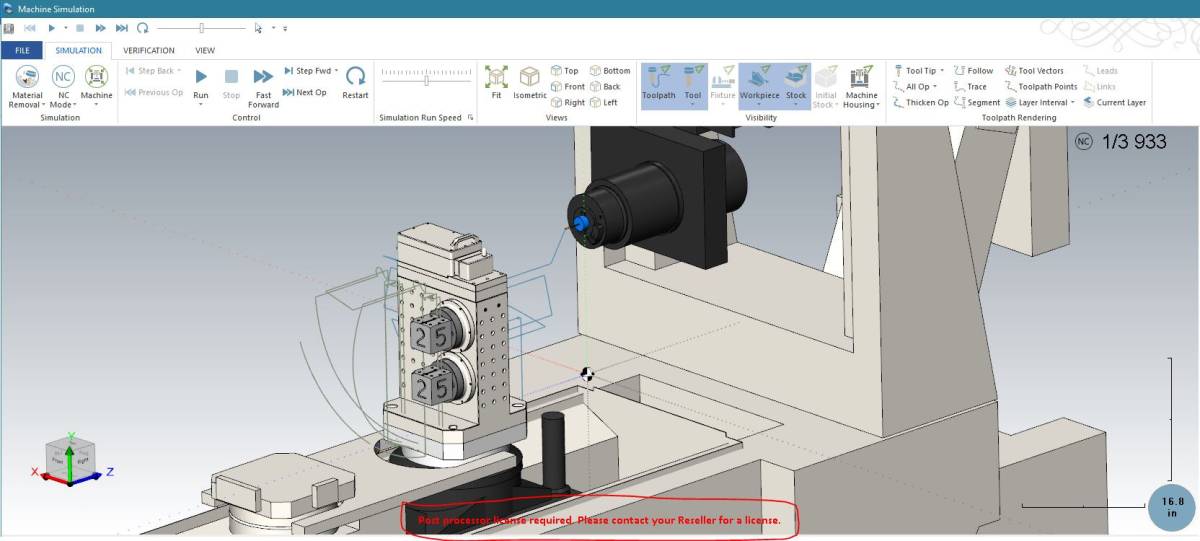
The warning states : “Post Processor License Required. Please contact your Reseller for a license.”
I don't think of this as a watermark, but that's that PY calls it. If you see the red warning when running machsim, find the latest email from PY. Just search your personal email for Watermark and you should find it pretty quickly. They always email us when they've updated the watermark, so the latest email from them should have the latest link to get this fixed.


