
This is an old revision of the document!
Table of Contents
Turning on Productivity Plus in a post
Productivity Plus is another name for Renishaw Probe (Probing). It can only be used for Mill (or Router) - not Lathe.
Turning on Probing should always be done if it's indicated on an invoice. Good practice, is for the Tech AE to reach out before they go onsite to ask use for the latest post, so we can double check this is done, however, this doesn't always happen. If a tech is onsite and finds we did not set this up correctly, they will always be under a crunch to get it fixed as quickly as possible. Please be respectful of their situation and handle it as a top-top priority.
If you see this anywhere on an invoice, make sure you turn on probing in the post:

Here is how you do it. All developers have turned it on in different ways.
First set the first line “O” number. O can be set to the following values:
O0 - no probing or poco
O1 - probing no poco
O10 - poco no probing
O11 - poco and probing
Then switch on the appropriate value. Here's a full description for each post:
Renishaw Probe for CQ
- Change the probe_out_CQP0011 to yes$
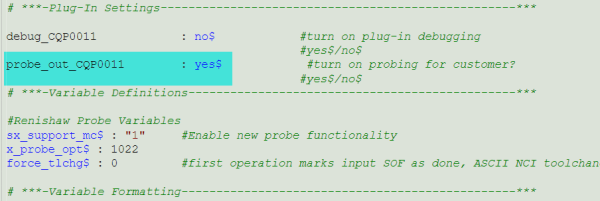


Note that CQ posts have the probing code in the locked section. We will need to set this properly for the tech team when they have to go onsite to setup the .Renmf. We DO NOT set up the .Renmf files!!!
Renishaw Probe for PY and CNC
- Set the O value for the first line to O1.

- Uncomment the sx_support_mc$ line to turn it on
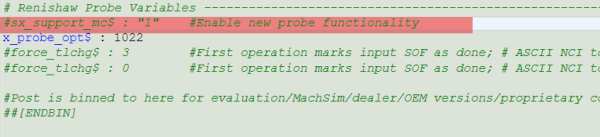

For PY, this is most likely already on. If CNC, this should be there in their newer posts. If you can't find this variable, its from an old post and we need to charge to add the Probing logic.
Note that the tech team has access to this section in non Cimquest posts. However, they will not be familiar with this and its still our responsibility to turn it on. In a pinch, you can instruct a tech AE how to do this himself if they are onsite and can't accept files for some reason. NOT true for CQ posts!
What if none of these keywords are in my post?
What if you're post, which ever one of the options above, do not have the key words from the descriptions above? That means your post is based on a very old version from before probing was added by default in the engine. As noted above, this is a quotable modification ONLY if it wasn't included on the INV. If it was quoted on the original invoice, then the price is padded for this already. This is why we started charging for probe logic in the first place.
If you don't find sx_support_mc$ this is a good indication your post does not have probing added in at all. Another thing to search would be probe. If its not there, and you need to add it after making sure the money end is kosher, you must add it.
If you need to add the probing logic, it will matter which post you use. CQ posts have a plug in. CNC posts will not work with the plug-in. PY or IHS posts should have it. If they don't, reach out to the developer and get the post up to the latest maintenance and let PY or IHS handle it.
Adding Probing Logic to CQ Engine Post
Use the plug-in and follow the step-by-step instructions in there. As of this writing, you can find the plug-in on the gdrive:
Adding Probing Logic to CNC Engine Post
Easiest way to do this is probably find the equivalent post on the extranet in the latest version. Run a file compare, and add anything that is probe related (inhibit_probe$, uninhibit_probe$, etc)


